ShowUp
Building on the existing design
When I joined BW, ShowUp was already a living, breathing product. I was brought in to design new features while also improving existing ones. One of my biggest challenges at the beginning was understanding the product and its complexity, but luckily I had a great team by my side who helped me along the way.
Working with the team
When I joined BW, ShowUp was already a living, breathing product. I was brought in to design new features while also improving existing ones. One of my biggest challenges at the beginning was understanding the product and its complexity, but luckily I had a great team by my side who helped me along the way.
ERC
What we had
ERC, or Exhibitor Registration Center, is one of ShowUp’s connected products, enabling event organizers and attendees to interact before, during, and after an event. Tasks can be created to collect user information, which can then be used to manage and filter attendees. All tasks are created within ShowUp and appear directly in ERC.
The original product already included the main feature: Task Creation. This involved defining a task type (such as a textbox, image gallery, item selection, and many others), setting a task title and description, specifying a due date, applying restrictions, and determining whether the task was mandatory. When I joined the project, ERC was already in its first version, but several important updates were needed.
Task Sections
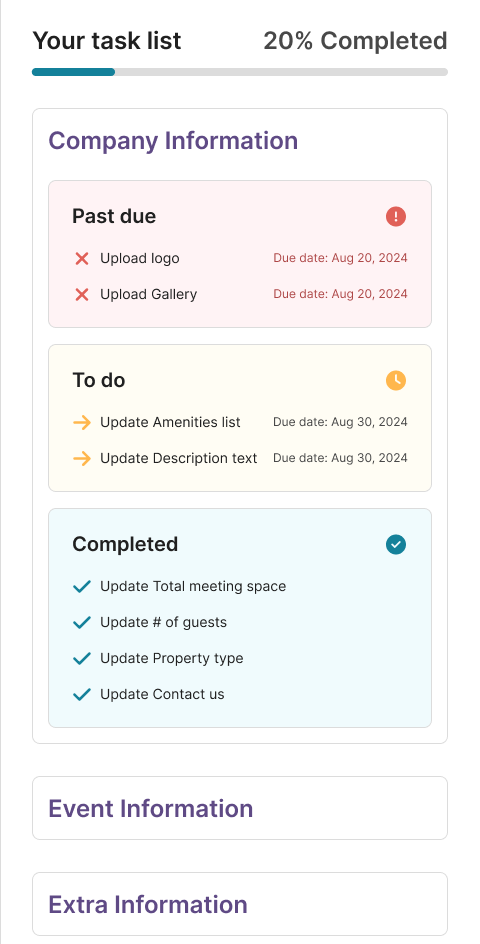
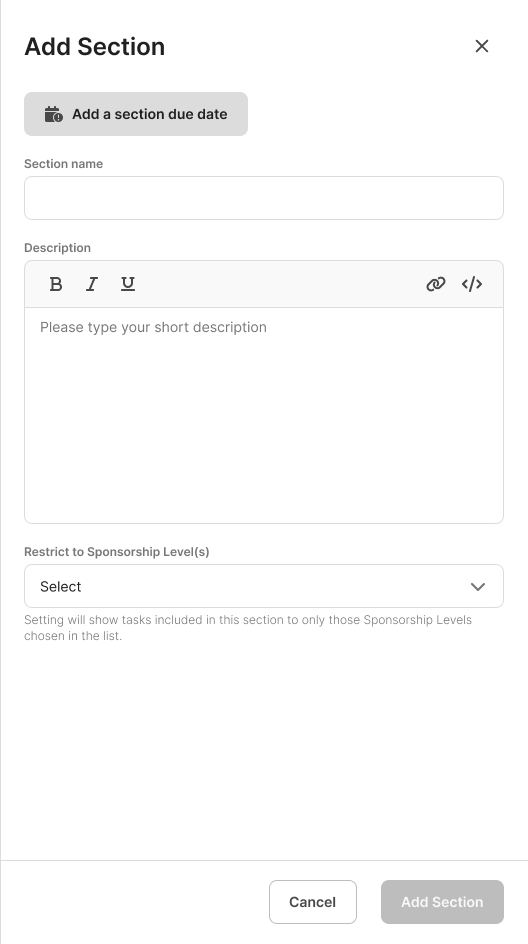
The first action I worked on was creating task sections. These followed the same structure as task creation: section name, section description, section due date, and any attendee restrictions.
The intention behind this was to make it easier for users to navigate and organize their tasks. Although this might seem like a small change, my experience with events has taught me that details that appear minor can make a significant difference. This impacts not only event attendees, who now have a faster and clearer way to stay up to date with their tasks, but also makes it easier for organizers to keep all the information well organized.
Important Dates, FAQ and Resources
ERC, or Exhibitor Registration Center, is one of ShowUp’s connected products, enabling event organizers and attendees to interact before, during, and after an event. Tasks can be created to collect user information, which can then be used to manage and filter attendees. All tasks are created within ShowUp and appear directly in ERC.
The original product already included the main feature: Task Creation. This involved defining a task type (such as a textbox, image gallery, item selection, and many others), setting a task title and description, specifying a due date, applying restrictions, and determining whether the task was mandatory. When I joined the project, ERC was already in its first version, but several important updates were needed.
New ERC
ERC, or Exhibitor Registration Center, is one of ShowUp’s connected products, enabling event organizers and attendees to interact before, during, and after an event. Tasks can be created to collect user information, which can then be used to manage and filter attendees. All tasks are created within ShowUp and appear directly in ERC.
The original product already included the main feature: Task Creation. This involved defining a task type (such as a textbox, image gallery, item selection, and many others), setting a task title and description, specifying a due date, applying restrictions, and determining whether the task was mandatory. When I joined the project, ERC was already in its first version, but several important updates were needed.
Scanner Apps
Planning and research
We received an expected flow from the marketing and insurance teams at Allianz, containing everything that was legally required and expected. Another key requirement was to connect it to the existing car insurance app they already had.
Our first step was to map out the entire flow. This was essential, as there were many small details and variables depending on each accident scenario. It also helped validate the team’s overall understanding of what was expected and allowed us to anticipate any potential issues.
For the research and insights, we explored how competitors manage their claims processes. We also looked into popular survey and research platforms for inspiration. To improve the tracking experience, we studied order tracking in e-commerce products. For the inspection scheduling flow, we referenced apps with maps and advanced filtering features.

Design and development steps
We kept everything on-brand using Allianz’s colors, fonts, and illustrations, so the platform would feel familiar and connected to their other products, especially the car insurance app.The flow was also expanded to cover all types of insurance claims (fires, accidents, burglary, and many others) and adapted to handle the specific requirements of each. For example, some claims involve third parties, different types of damage, police reports (BO), photos, detailed descriptions, and even changes in how maps and info cards are displayed.
Additionally, we added the ability for third parties involved in a claim to view and provide any valuable information needed for the process.
As we worked, new ideas continued to emerge. Some features received quick updates to speed up development, such as switching the progress bar from vertical to horizontal, adjusting buttons and illustrations when necessary, and, as is common in design, spending time discussing the best terms and phrasing to use. These might seem like minor adjustments, but they have a significant impact on the overall user experience.
ShowUp
Summary
This is a compilation of my work as the lead product designer for BW Events' biggest product, ShowUp.
ShowUp is a digital platform focused on corporate events and conferences, providing integrated tools to optimize the management and experience of participants at both in-person and hybrid events.
My work here consists of integrating new features (from client requests or usability improvements) into the ShowUp platform and its apps. I work daily with the product team as well as front-end and back-end developers.

Just FYI: This whole page is better suited for desktop ;)
ShowUp
Building on the existing design
When I joined BW, ShowUp was already a living, breathing product. I was brought in to design new features while also improving existing ones. One of my biggest challenges at the beginning was understanding the product and its complexity, but luckily I had a great team by my side who helped me along the way.
Working with the team
When I joined BW, ShowUp was already a living, breathing product. I was brought in to design new features while also improving existing ones. One of my biggest challenges at the beginning was understanding the product and its complexity, but luckily I had a great team by my side who helped me along the way.
ERC
What we had
ERC, or Exhibitor Registration Center, is one of ShowUp’s connected products, enabling event organizers and attendees to interact before, during, and after an event. Tasks can be created to collect user information, which can then be used to manage and filter attendees. All tasks are created within ShowUp and appear directly in ERC.
The original product already included the main feature: Task Creation. This involved defining a task type (such as a textbox, image gallery, item selection, and many others), setting a task title and description, specifying a due date, applying restrictions, and determining whether the task was mandatory. When I joined the project, ERC was already in its first version, but several important updates were needed.
Task Sections
The first action I worked on was creating task sections. These followed the same structure as task creation: section name, section description, section due date, and any attendee restrictions.
The intention behind this was to make it easier for users to navigate and organize their tasks. Although this might seem like a small change, my experience with events has taught me that details that appear minor can make a significant difference. This impacts not only event attendees, who now have a faster and clearer way to stay up to date with their tasks, but also makes it easier for organizers to keep all the information well organized.
Important Dates, FAQ and Resources
ERC, or Exhibitor Registration Center, is one of ShowUp’s connected products, enabling event organizers and attendees to interact before, during, and after an event. Tasks can be created to collect user information, which can then be used to manage and filter attendees. All tasks are created within ShowUp and appear directly in ERC.
The original product already included the main feature: Task Creation. This involved defining a task type (such as a textbox, image gallery, item selection, and many others), setting a task title and description, specifying a due date, applying restrictions, and determining whether the task was mandatory. When I joined the project, ERC was already in its first version, but several important updates were needed.
New ERC
ERC, or Exhibitor Registration Center, is one of ShowUp’s connected products, enabling event organizers and attendees to interact before, during, and after an event. Tasks can be created to collect user information, which can then be used to manage and filter attendees. All tasks are created within ShowUp and appear directly in ERC.
The original product already included the main feature: Task Creation. This involved defining a task type (such as a textbox, image gallery, item selection, and many others), setting a task title and description, specifying a due date, applying restrictions, and determining whether the task was mandatory. When I joined the project, ERC was already in its first version, but several important updates were needed.
Scanner Apps
Planning and research
We received an expected flow from the marketing and insurance teams at Allianz, containing everything that was legally required and expected. Another key requirement was to connect it to the existing car insurance app they already had.
Our first step was to map out the entire flow. This was essential, as there were many small details and variables depending on each accident scenario. It also helped validate the team’s overall understanding of what was expected and allowed us to anticipate any potential issues.
For the research and insights, we explored how competitors manage their claims processes. We also looked into popular survey and research platforms for inspiration. To improve the tracking experience, we studied order tracking in e-commerce products. For the inspection scheduling flow, we referenced apps with maps and advanced filtering features.

Design and development steps
We kept everything on-brand using Allianz’s colors, fonts, and illustrations, so the platform would feel familiar and connected to their other products, especially the car insurance app.The flow was also expanded to cover all types of insurance claims (fires, accidents, burglary, and many others) and adapted to handle the specific requirements of each. For example, some claims involve third parties, different types of damage, police reports (BO), photos, detailed descriptions, and even changes in how maps and info cards are displayed.
Additionally, we added the ability for third parties involved in a claim to view and provide any valuable information needed for the process.
As we worked, new ideas continued to emerge. Some features received quick updates to speed up development, such as switching the progress bar from vertical to horizontal, adjusting buttons and illustrations when necessary, and, as is common in design, spending time discussing the best terms and phrasing to use. These might seem like minor adjustments, but they have a significant impact on the overall user experience.
ShowUp
Summary
This is a compilation of my work as the lead product designer for BW Events' biggest product, ShowUp.
ShowUp is a digital platform focused on corporate events and conferences, providing integrated tools to optimize the management and experience of participants at both in-person and hybrid events.
My work here consists of integrating new features (from client requests or usability improvements) into the ShowUp platform and its apps. I work daily with the product team as well as front-end and back-end developers.
ShowUp
ShowUp
Building on the existing design
When I joined BW, ShowUp was already a living, breathing product. I was brought in to design new features while also improving existing ones. One of my biggest challenges at the beginning was understanding the product and its complexity, but luckily I had a great team by my side who helped me along the way.
Working with the team
When I joined BW, ShowUp was already a living, breathing product. I was brought in to design new features while also improving existing ones. One of my biggest challenges at the beginning was understanding the product and its complexity, but luckily I had a great team by my side who helped me along the way.
ERC
What we had
ERC, or Exhibitor Registration Center, is one of ShowUp’s connected products, enabling event organizers and attendees to interact before, during, and after an event. Tasks can be created to collect user information, which can then be used to manage and filter attendees. All tasks are created within ShowUp and appear directly in ERC.
The original product already included the main feature: Task Creation. This involved defining a task type (such as a textbox, image gallery, item selection, and many others), setting a task title and description, specifying a due date, applying restrictions, and determining whether the task was mandatory. When I joined the project, ERC was already in its first version, but several important updates were needed.
Task Sections
The first action I worked on was creating task sections. These followed the same structure as task creation: section name, section description, section due date, and any attendee restrictions.
The intention behind this was to make it easier for users to navigate and organize their tasks. Although this might seem like a small change, my experience with events has taught me that details that appear minor can make a significant difference. This impacts not only event attendees, who now have a faster and clearer way to stay up to date with their tasks, but also makes it easier for organizers to keep all the information well organized.
Important Dates, FAQ and Resources
ERC, or Exhibitor Registration Center, is one of ShowUp’s connected products, enabling event organizers and attendees to interact before, during, and after an event. Tasks can be created to collect user information, which can then be used to manage and filter attendees. All tasks are created within ShowUp and appear directly in ERC.
The original product already included the main feature: Task Creation. This involved defining a task type (such as a textbox, image gallery, item selection, and many others), setting a task title and description, specifying a due date, applying restrictions, and determining whether the task was mandatory. When I joined the project, ERC was already in its first version, but several important updates were needed.
New ERC
ERC, or Exhibitor Registration Center, is one of ShowUp’s connected products, enabling event organizers and attendees to interact before, during, and after an event. Tasks can be created to collect user information, which can then be used to manage and filter attendees. All tasks are created within ShowUp and appear directly in ERC.
The original product already included the main feature: Task Creation. This involved defining a task type (such as a textbox, image gallery, item selection, and many others), setting a task title and description, specifying a due date, applying restrictions, and determining whether the task was mandatory. When I joined the project, ERC was already in its first version, but several important updates were needed.
Scanner Apps
Planning and research
We received an expected flow from the marketing and insurance teams at Allianz, containing everything that was legally required and expected. Another key requirement was to connect it to the existing car insurance app they already had.
Our first step was to map out the entire flow. This was essential, as there were many small details and variables depending on each accident scenario. It also helped validate the team’s overall understanding of what was expected and allowed us to anticipate any potential issues.
For the research and insights, we explored how competitors manage their claims processes. We also looked into popular survey and research platforms for inspiration. To improve the tracking experience, we studied order tracking in e-commerce products. For the inspection scheduling flow, we referenced apps with maps and advanced filtering features.
Design and development steps
We kept everything on-brand using Allianz’s colors, fonts, and illustrations, so the platform would feel familiar and connected to their other products, especially the car insurance app.The flow was also expanded to cover all types of insurance claims (fires, accidents, burglary, and many others) and adapted to handle the specific requirements of each. For example, some claims involve third parties, different types of damage, police reports (BO), photos, detailed descriptions, and even changes in how maps and info cards are displayed.
Additionally, we added the ability for third parties involved in a claim to view and provide any valuable information needed for the process.
As we worked, new ideas continued to emerge. Some features received quick updates to speed up development, such as switching the progress bar from vertical to horizontal, adjusting buttons and illustrations when necessary, and, as is common in design, spending time discussing the best terms and phrasing to use. These might seem like minor adjustments, but they have a significant impact on the overall user experience.
Summary
This is a compilation of my work as the lead product designer for BW Events' biggest product, ShowUp.
ShowUp is a digital platform focused on corporate events and conferences, providing integrated tools to optimize the management and experience of participants at both in-person and hybrid events.
My work here consists of integrating new features (from client requests or usability improvements) into the ShowUp platform and its apps. I work daily with the product team as well as front-end and back-end developers.